
Fridge Display
Best for the kitchen or wall tablet. Large at-a-glance panels for today, shopping, recipes, and quick apps.
 Household HQ
A calmer command center for home
Household HQ helps families manage appointments, groceries, household inventory, recipes, reminders and events, plus a shared Fridge/Wall dashboard for the whole home.
Optional Google integrations. Connect Google Calendar to sync Household HQ appointments, or use Google Photos Picker to select photos for your private household Fridge display.
Choose how you want to use your household today.
Best for the kitchen or wall tablet. Large at-a-glance panels for today, shopping, recipes, and quick apps.
Open the full Household Hub app for appointments, grocery, inventory, recipes, people, and household records.
Take your shopping list to the store. Focused, phone-friendly sections for checking off items as you shop.
Here’s what’s happening at home.
No documented assets yet.
Household HQ support
Everything here is written for the way Household HQ works today.
Create an account, then complete setup with Your Name and a Household Name. After setup, you go directly into Household HQ.
Home basics: At a Glance shows information. Quick Actions are tappable shortcuts.
Appointments are scheduled visits or services such as a doctor, dentist, or repair appointment. They can sync to Google Calendar when connected.
Household Events / Reminders are Household HQ activities and reminders. They stay local to Household HQ, may recur, and Wall/Fridge “Done” applies to that occurrence only. Future recurring occurrences remain.
Add groceries manually, set quantities, use category/catalog quick picks, or tap the favorite star. You can keep up to 24 grocery favorites for quick access; Manage Favorites is available for bulk changes. Favorites are quick access, not the entire catalog.
Store Mode focuses on shopping. Completed items move to the Completed section, and Clear Checked removes completed items when you choose it.
Try saying: “We need eggs.” “Add milk too.” “Throw bread on there.” “Add Diet Mountain Dew.” “Two Cokes too.” “What appointments do we have tomorrow?” “No, that’s it.” After a successful request, Household HQ may ask “Anything else?” Continue naturally, or say “No” or “That’s it” to end.
Add Inventory records with a name, category, location, photos, maker/brand, model/description, and estimated current value. Look Up Value can help with research, while More Details keeps optional fields out of the way. Edit existing items or delete them explicitly.
Save Recipes you want to keep, import a recipe when supported, and use saved recipes from the Grocery / Recipes area.
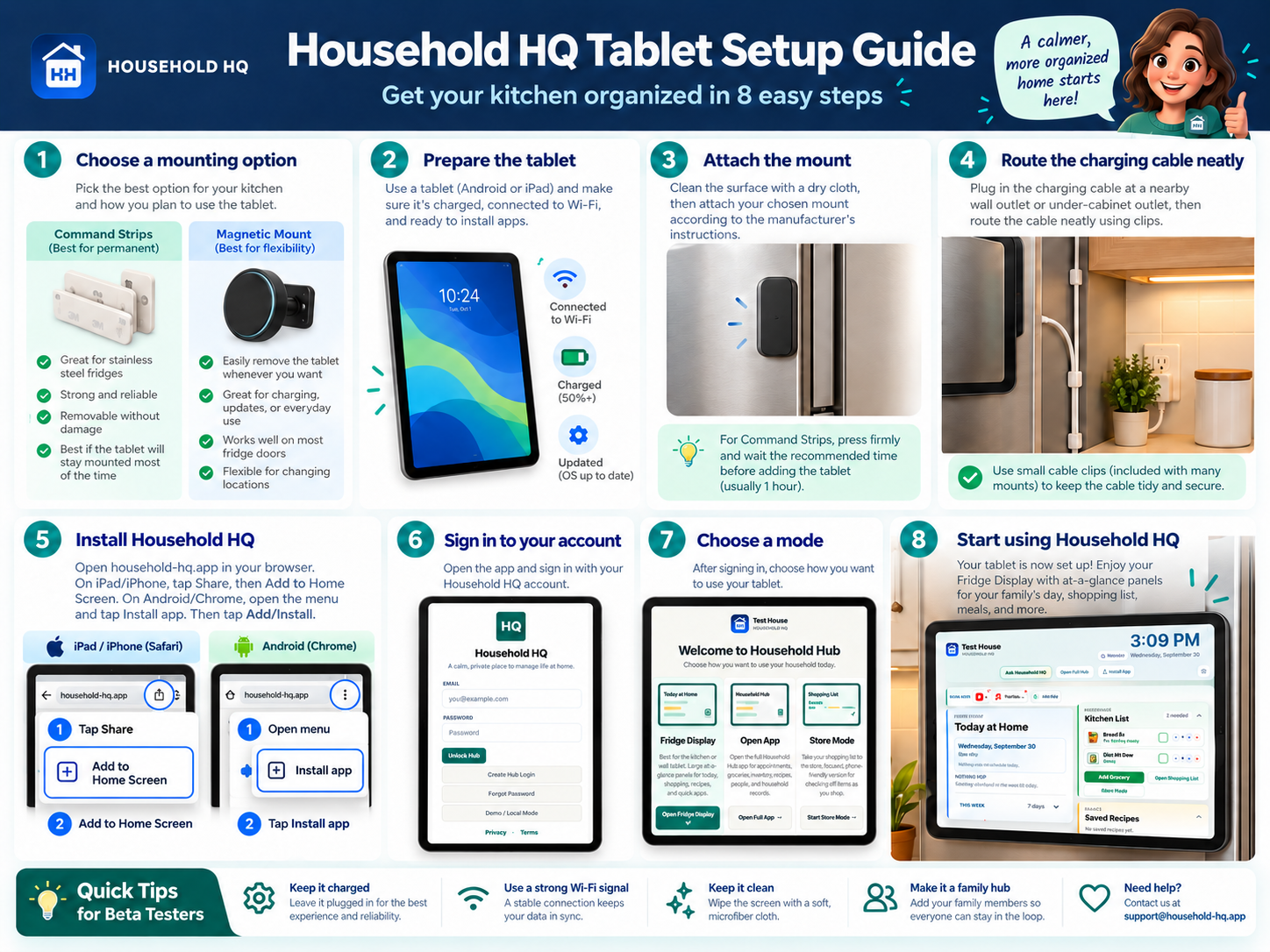
Wall / Fridge is the household display mode for Today, Upcoming, This Week, appointments, household events/reminders, Kitchen List, Saved Recipes, Chore Board, Quick Apps, rotating photos when configured, Ask Household HQ, and grocery quick picks/favorites.
It is designed for a mounted tablet but can also be opened normally. Use Install App where supported.
Settings includes Profile, Household Name, People, Providers, Quick Apps, Install App, Reports / Backup, Privacy, Terms, and Support. Google Calendar is the connection used for Appointment sync. Google Photos can provide selected photos for Household HQ where supported.
Mount the tablet securely with hardware suitable for its weight. Removable mounting strips are often better for stainless refrigerators; flat magnets are useful when the tablet needs to come down regularly. Route the charging cable neatly to a nearby wall or counter outlet.
Do not block refrigerator vents, controls, dispenser, handles, or door clearance. Use Install Household HQ to add the PWA to the home screen where supported, then open Wall / Fridge mode.
Found a problem, have an idea, or need help? Send it here.
Household Hub keeps appointments, groceries, recipes, providers, and asset records organized for this household.
Learn the basics, get quick answers, or send us feedback.
Add Household HQ to your device for quick access.
Members of this household see the same groceries, recipes, appointments, providers, and asset records.
Generate an invitation, then open your email or messages app—or share the link directly.
Archived people stay on old appointment records but are hidden from new appointment choices.
Using the browser default voice.
Start with the Inventory / Insurance report, then print schedule or grocery summaries when useful.
Connect Google to enable the household Calendar mirror and choose Fridge Photos with Google Photos Picker.
Photos shared by your household appear in the fridge photo frame.
Import from Google Photos if you want to copy an existing selection into the household collection.
A private household command center for schedule, shopping, recipes, providers, and insurance-ready asset records.